BYE THE BLUETOOTH EAREPHONE LINK 👉🏻 buy this earephone Also visit my store👉🏻 https://amzn.to/3jnXio8 Samsung Galaxy M42 5G (Prism Dot Black, 8GB RAM, 128GB Storage) 👉🏻 https://amzn.to/3ymO5jW Studd Halmets https://amzn.to/3sTTxcY Boya m1 mic = https://amzn.to/38F5qu5 Bluethooth boat 210 https://amzn.to/2ZfvlHp Cap https://amzn.to/3EvQMnA Sport shoe https://amzn.to/3kE3zwk
HELLO HERE IS 3D LAYER SOCIAL ICONS SOURCE CODE
YOU MUST HAVE INTERNET CONNECTION TO RUN THIS PROJECT !

1-COPY THIS HTML CSS CODE
<html>
<head>
<title>CSS SOCIAL MEDIA ICON HOVER EFFECTS</title>
<link rel="stylesheet" type="text/css" href="style.css">
<link href="https://stackpath.bootstrapcdn.com/
font-awesome/4.7.0/css/font-awesome.min.css"
rel="stylesheet">
</head>
<body>
<ul>
<li>
<a href="#">
<span></span>
<span></span>
<span></span>
<span></span>
<span class="fa fa-facebook"
aria-hidden="true"></span>
</a>
</li>
<li>
<a href="#">
<span></span>
<span></span>
<span></span>
<span></span>
<span class="fa fa-twitter"
aria-hidden="true"></span>
</a>
</li>
<li>
<a href="#">
<span></span>
<span></span>
<span></span>
<span></span>
<span class="fa fa-google-plus"
aria-hidden="true"></span>
</a>
</li>
<li>
<a href="#">
<span></span>
<span></span>
<span></span>
<span></span>
<span class="fa fa-linkedin"
aria-hidden="true"></span>
</a>
</li>
<li>
<a href="#">
<span></span>
<span></span>
<span></span>
<span></span>
<span class="fa fa-instagram"
aria-hidden="true"></span>
</a>
</li>
</ul>
<style>
body {
margin: 0;
padding: 0;
height: 100vh;
display: flex;
align-items: center;
justify-content: center;
/* background-color:black;*/
}
ul {
position: relative;
margin: 0;
padding: 0;
display: flex;
}
ul li {
position: relative;
list-style: none;
width: 60px;
height: 60px;
margin: 0 30px;
transform: rotate(-35deg) skew(29deg);
background: #fff;
box-shadow: 2px 5px 5px grey;
}
ul li a{
color: aliceblue;
display: flex;
justify-content: center;
align-items: center;
text-decoration: none;
margin-top: 12px;
font-size: 25px;
padding: 5px;
}
ul li:hover span {
position: absolute;
top: 0;
left: 12px;
width: 100%;
height: 100%;
background-color: black;
transition: 0.4s;
display: flex !important;
align-items: center;
justify-items: center;
color: #fff;
font-weight: bolder;
font-size: 40px !important;
}
ul li:hover span {
box-shadow: -1px 1px 1px rgba(0, 0, 0, .1);
}
ul li:hover span:nth-child(5) {
transform: translate(50px, -40px);
opacity: 2.1;
}
ul li:hover span:nth-child(4) {
transform: translate(30px, -30px);
opacity: .8;
}
ul li:hover span:nth-child(3) {
transform: translate(20px, -20px);
opacity: .6;
}
ul li:hover span:nth-child(2) {
transform: translate(10px, -10px);
opacity: .4;
}
ul li:hover span:nth-child(1) {
transform: translate(0, 0);
opacity: .2;
}
ul li:nth-child(1) {
background-color: #3b5999;
}
ul li:nth-child(2) {
background-color: #55acee;
}
ul li:nth-child(3) {
background-color: #dd4b39;
}
ul li:nth-child(4) {
background-color: #0077B5;
}
ul li:nth-child(5) {
background-color: #e4405f;
}
.fa
{
display: flex;
justify-content: center;
align-items: center;
}
</style>
</body>
</html>
THANK YOU HAVE A GOOD CODING JOURNEY ❤
Comments
Popular posts from this blog
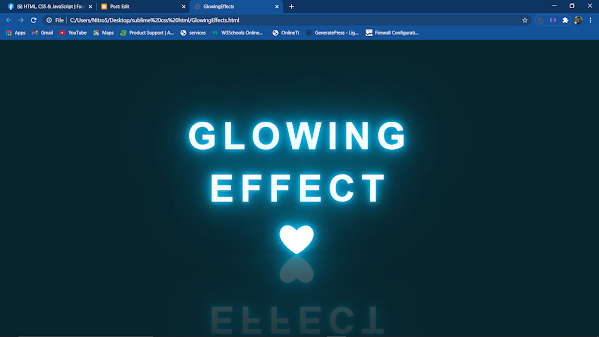
HERE IS GLOWING EFFECT TEXT USING HTML, CSS 1- COPY THIS HTML CSS CODE <!DOCTYPE html> <html lang="en"> <head> <meta charset="UTF-8"> <title>GlowingEffects</title> </head> <body> <h2 contenteditable="true" class="avi">abhi+shek</h2> </body> </html> <style> *{ margin: 0; padding: 0; box-sizing: border-box; font-family: arial; } body{ display: flex; justify-content: center; align-items: center; min-height: 100vh; background: #07252d; } h...

HERE IS ANIMATED LOGIN FORM SOURCE CO DE COPY THIS HTML AND CSS CODE <! DOCTYPE html > < html lang = "en" > < head > < meta charset = "UTF-8" > < title > Document </ title > </ head > < body > < html > < head > < title > Animated login form </ title > < link rel = "stylesheet" href = "style.css" > </ head > < body > < section > < form class = "box" action = "index.html" method = "post" > < h1 > login </ h1 > < input type = "text" name = "" placeholder = ...
how to upload created page into web
ReplyDeleteSave this code with name project.html and run into browser
Delete